Inside DKMS: State, Kbuild, and the Life of an NVIDIA Kernel Module
A systems-level account of what DKMS owns, what Kbuild and the kernel decide, and how initramfs snapshots complicate NVIDIA driver upgrades.
On this page
DKMS is often described as the thing that “rebuilds a driver after a kernel update.” That description is operationally useful and architecturally misleading.
DKMS does not define the kernel module ABI. It does not compile C, resolve relocations, validate symbol namespaces, enforce module signatures, regenerate every early-boot image, or decide whether a module may enter the running kernel. It coordinates other tools that do those things, and it records enough state to repeat that coordination for more than one kernel.
This distinction matters with the NVIDIA Linux driver because the object called “the driver” is not one object. A normal installation may contain five cooperating kernel modules, user-space libraries, device nodes, firmware, a resource-manager implementation, and—on modern GPUs—a GSP firmware runtime. DKMS can successfully install a set of .ko files while the machine still boots an older copy from initramfs, rejects a signature, binds the device to another driver, or pairs the modules with incompatible user space.
The useful question is therefore not “did DKMS work?” It is:
Which component materialized which artifact for which kernel, which copy did early userspace select, and which checks did the running kernel apply?
That question turns a vague driver problem into a sequence of inspectable state transitions.
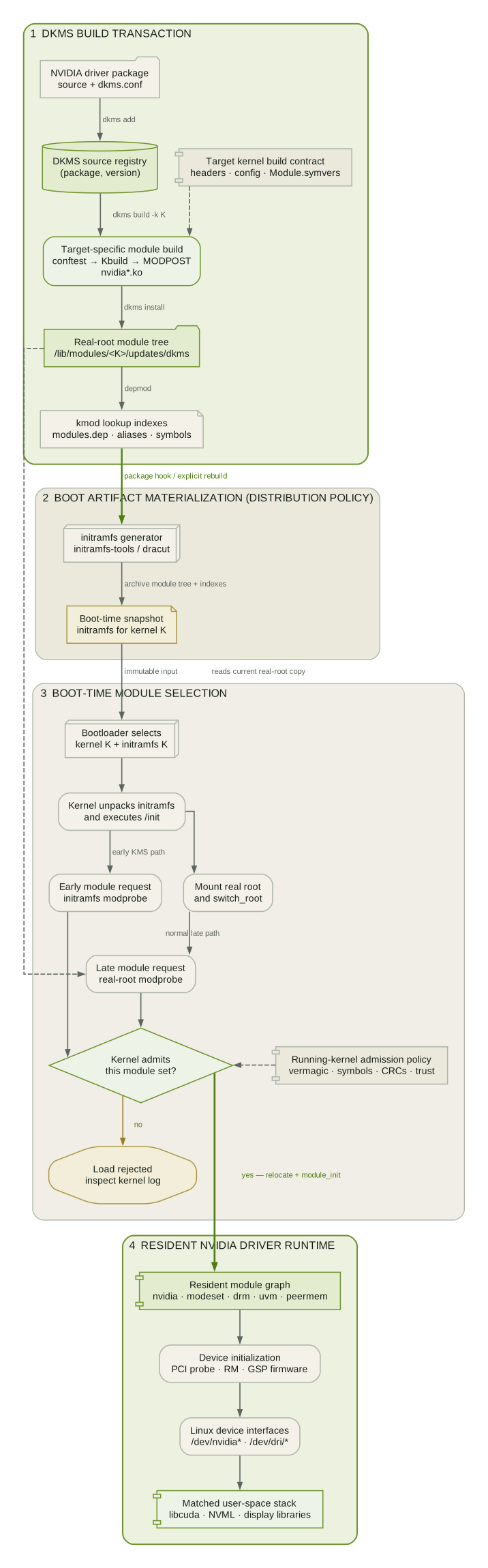
DKMS Manages Materialization, Not Compatibility
An out-of-tree module lives outside the kernel source tree that produced the target kernel. It therefore has to be materialized again whenever the build contract changes. That contract is wider than a function prototype list. It includes:
- the target kernel release and architecture;
- generated configuration headers and compiler feature tests;
- exported symbols and, when enabled, their modversion CRCs;
- compiler and linker behavior that the kernel build expects;
- vendor adaptation code for APIs that are not stable across kernels;
- the signing policy applied after the ELF object is linked.
DKMS gives this repeated materialization a stable identity. The practical key is close to:
(package name, package version, kernel release, architecture)For example, nvidia/580.82.09 built for 6.14.0-27-generic/x86_64 is a different state entry from the same driver version built for 6.11.0-29-generic/x86_64. A successful build for one says nothing about the other.
The important states are deliberately separate:
source registered artifact produced artifact placed added ───────────▶ built ───────────▶ installedUpstream DKMS documents add, build, and install as distinct actions. build can implicitly add, and install can implicitly build, but the resulting states remain meaningful. “Added” proves that DKMS can identify source and configuration. “Built” proves that the vendor build completed for one target tuple. “Installed” proves that selected module artifacts were copied into the target module tree. None proves that the module is loaded.
This is why dkms status is useful but not dispositive. It reports the state of the DKMS tree, not the state of the kernel.
The DKMS Tree Is a Small Build Database
A distribution package normally places source under:
/usr/src/<package>-<version>/After dkms add, DKMS records that package/version in its own tree, conventionally under /var/lib/dkms. A build for one kernel and architecture receives its own working directory. The exact layout varies slightly by release and distribution, but the model is stable:
/var/lib/dkms/<package>/<version>/├── source -> /usr/src/<package>-<version>└── <kernel>/<arch>/ ├── build/ ├── log/make.log └── module/The source link establishes identity; build is disposable working state; make.log is the build-system transcript; and module contains the artifacts that DKMS has selected for installation. Treating this as a database suggests a useful diagnostic rule: inspect the transition that failed, not only the final error surfaced by a package manager.
If source registration is broken, look at /usr/src, the source link, and dkms.conf. If compilation failed, start with make.log and the target kernel build tree. If installation succeeded but loading failed, leave make.log behind and inspect the installed object, module indexes, initramfs, kernel log, and trust policy.
dkms.conf Is an Executable Adapter Contract
dkms.conf looks declarative, but upstream DKMS describes it as a shell script of variable definitions that DKMS sources. This has two consequences.
First, it is the adapter between a vendor package and a generic lifecycle engine. DKMS cannot infer that NVIDIA produces several modules, where its build places them, or which build command fits a particular kernel. The configuration supplies that knowledge through directives such as:
PACKAGE_NAME="nvidia"PACKAGE_VERSION="580.82.09"
BUILT_MODULE_NAME[0]="nvidia"BUILT_MODULE_NAME[1]="nvidia-modeset"BUILT_MODULE_NAME[2]="nvidia-drm"BUILT_MODULE_NAME[3]="nvidia-uvm"BUILT_MODULE_NAME[4]="nvidia-peermem"
MAKE[0]="make modules"AUTOINSTALL="yes"
The real packaged configuration may use generated values, different locations, and distribution overrides; the example shows the shape, not a copy of a particular NVIDIA package.
The indexed directives form families. MAKE[n] is selected by MAKE_MATCH[n]; PATCH[n] is gated by PATCH_MATCH[n]; and the built name, built location, destination name, destination location, and strip policy for a module share an index. A multi-module driver is not “one DKMS module” in the ELF sense. It is one DKMS package whose configuration maps several build outputs into the kernel module tree.
Second, sourcing the file means it belongs to the package trust boundary. A root-run dkms install is not consuming inert metadata. Package scripts, DKMS hooks, and local overrides under /etc/dkms can execute code as part of the lifecycle. This is one reason distribution packaging matters: it owns the policy around when DKMS runs, how Secure Boot keys are provisioned, and what happens after files change under /lib/modules.
Several directives are particularly useful when reading a real package:
BUILD_EXCLUSIVE_*expresses which kernels, architectures, or kernel configurations are eligible. An autoinstall may intentionally skip an excluded target.PRE_BUILDandPOST_BUILDcan prepare or transform the vendor build.PRE_INSTALLandPOST_INSTALLmove policy around installation.BUILD_DEPENDSdescribes dependencies on other DKMS-managed packages, not ordinary ELF imports.AUTOINSTALL=yesasks the autoinstaller to materialize the package for relevant kernels; it is not a promise that every future kernel will compile it successfully.
The separation is clean: dkms.conf explains how to ask the vendor build for artifacts. It cannot guarantee the request is compatible with a new kernel.
Kbuild Produces the Module DKMS Records
The canonical external-module build enters the target kernel build system:
make -C /lib/modules/<kernel-release>/build M="$PWD" modules-C transfers control to the kernel build tree; M= tells Kbuild which external directory contains the module. DKMS may construct or wrap this command, but Kbuild owns the compilation and module-link stages.
The distinction between a source tree and a prepared build tree is important. External modules need generated headers and configuration corresponding to the target kernel. The convenient /lib/modules/<K>/build link is therefore part of the build contract. Installing “some kernel headers” is insufficient if they do not match <K>.
There is a sharper edge under CONFIG_MODVERSIONS. The kernel documentation notes that modules_prepare does not generate Module.symvers; a full kernel build is needed to produce symbol-version information. An external module can see the right headers and still lack the CRC database required to construct its import version table.
For NVIDIA, the vendor layer adds another stage before or around Kbuild: conformance probes. Kernel APIs change by signature, field presence, header location, configuration, and semantics. NVIDIA’s build runs small compile tests and generates compatibility decisions for the target kernel. A conftest failure is not “DKMS being incompatible with Linux.” It is the NVIDIA adaptation layer failing to classify or support the target kernel environment.
Kbuild then compiles translation units and runs modpost. modpost consumes symbol information, checks imports, emits module metadata, and contributes the generated module glue used in the final link. The result is a relocatable ELF object, not a self-contained executable.
What the .ko Actually Carries
A kernel object is useful to reason about as four overlapping contracts.
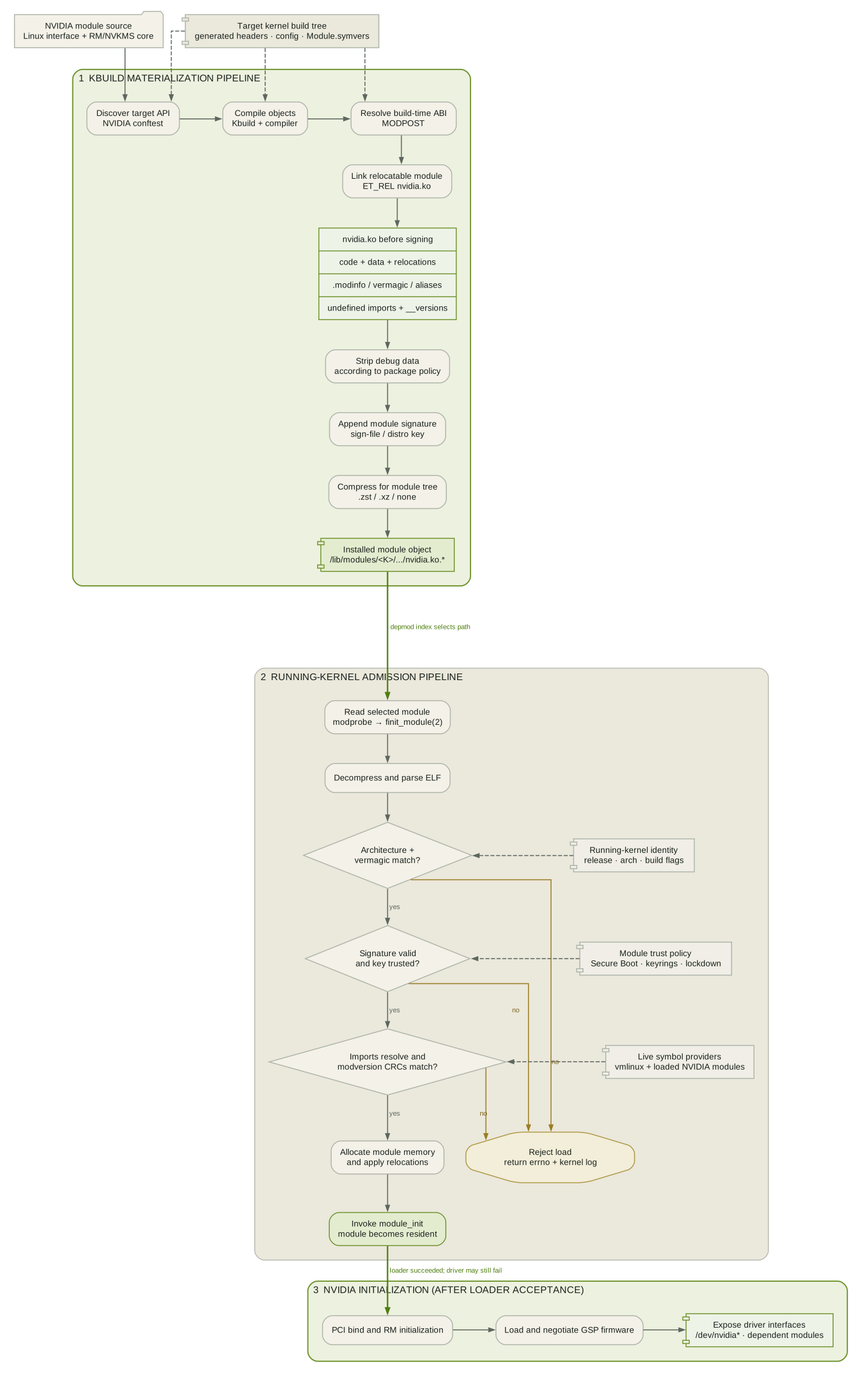
ELF structure
The object contains allocatable code and data sections, relocation records, symbol tables, and generated sections used by the module loader. Because final addresses are unknown at build time, the loader allocates memory and applies relocations against the running kernel and already loaded modules.
Inspect the structure directly:
readelf -hW nvidia.koreadelf -SW nvidia.koreadelf -rW nvidia.koIf the installed module is compressed, operate on a temporary decompressed copy or use tools in your distribution that understand the compression format.
Identity and loader metadata
The .modinfo section records strings such as license, aliases, parameters, dependencies, version, and vermagic:
modinfo -F filename nvidiamodinfo -F vermagic nvidiamodinfo -F depends nvidia_drmmodinfo -F signer nvidiavermagic is a coarse compatibility stamp derived from the kernel build. It can include the release plus configuration properties such as SMP, preemption, and module-unload behavior. A matching release string is therefore not the entire contract, and forcing around a mismatch does not make layouts or semantics compatible.
Imported symbol versions
With modversions enabled, exported kernel symbols have CRCs recorded in Module.symvers. The module carries expected CRCs for imports in __versions, or in the extended modversion sections used for long symbol names. At load time, the kernel can reject an import whose expected CRC differs from the provider’s exported CRC.
This is finer-grained than vermagic: the module can target the right release yet disagree about a specific symbol contract. It also explains why several out-of-tree modules that share private exports should be built together or exchange symbol-version information through a common top-level Kbuild or KBUILD_EXTRA_SYMBOLS.
NVIDIA’s module family makes this concrete. nvidia_modeset, nvidia_drm, nvidia_uvm, and nvidia_peermem depend on services exported by the core nvidia module. A mixture from two driver releases may pass filesystem-level inspection and still fail at import resolution or refuse to cooperate at runtime.
Signature trailer
Signed kernel modules have a signature appended to the module file. The kernel documentation emphasizes that this data is outside the ELF container. Signing must therefore be the last semantic transformation: stripping or otherwise mutating the file after signing invalidates the signature.
The build/package pipeline must order operations intentionally:
link → strip/debug handling → sign → compress → installThe loader then decides whether an unsigned, untrusted, malformed, or invalidly signed module is acceptable under the active policy. DKMS can invoke signing machinery and report an installed file. It cannot overrule Secure Boot, kernel lockdown, trusted keyrings, or module.sig_enforce.
Installing a Module Is Not Loading It
dkms install copies selected artifacts into the module tree for a target kernel, commonly beneath:
/lib/modules/<K>/updates//lib/modules/<K>/updates/dkms//lib/modules/<K>/extra/The exact destination is distribution policy. DKMS then normally runs depmod, unless explicitly told not to. depmod scans the tree and constructs indexes such as module dependencies, aliases, symbols, and built-ins. modprobe consults those indexes, configuration, soft dependencies, blacklists, and install rules to choose and load a module graph.
That yields another set of distinct facts:
file exists ≠ depmod indexes select it ≠ modprobe requested it ≠ kernel accepted itName collisions make this operationally important. DKMS preserves a pre-existing same-named object as an original_module during first installation and may restore it during uninstall. Multiple same-named files can also exist in different directories. modinfo -n <name> tells you which path the current indexes select; it does not tell you which bytes are already resident.
Once loaded, a module is kernel memory. Replacing its file does not hot-swap the resident code. Compare disk and runtime explicitly:
modinfo -F version nvidiacat /proc/driver/nvidia/versioncat /sys/module/nvidia/version 2>/dev/nullFor NVIDIA, unloading is often impractical on a live graphical or compute system because device files, display servers, CUDA processes, persistence services, or peer-memory users hold references. A clean reboot is not superstition; it is frequently the only controlled way to establish a coherent module set.
Initramfs Creates a Second Module Filesystem
The most confusing upgrade failures begin with a correct observation applied to the wrong filesystem.
An initramfs is a cpio archive unpacked into the kernel’s initial root filesystem. Its /init runs as early userspace, locates and mounts the real root device, and eventually hands control to the normal userspace with switch_root. It may need storage, filesystem, encryption, networking, and display modules before the real root is available.
That archive can contain its own copy of:
/lib/modules/<K>/kernel/.../lib/modules/<K>/updates/.../lib/modules/<K>/modules.dep(.bin)/lib/modules/<K>/modules.alias(.bin)It is therefore not a live view of the real root’s /lib/modules. It is a snapshot assembled at image-generation time.
This produces three independently inspectable versions of “the NVIDIA module”:
| Plane | What it represents | Typical evidence |
|---|---|---|
| Real-root filesystem | What a future modprobe can select after switch_root |
modinfo -n, file hash |
| Initramfs image | What early userspace can select before switch_root |
lsinitramfs or lsinitrd, extracted file hash |
| Running kernel | What has already been relocated and initialized | /proc/driver/nvidia/version, /sys/module, kernel log |
A package upgrade can update the first plane while leaving the second unchanged and the third still resident. All three observations may be internally correct and mutually different.
Why NVIDIA can be loaded early
On systems configured for early kernel mode setting, the initramfs may include nvidia, nvidia_modeset, and nvidia_drm and arrange for them to load during early userspace. The exact module set and trigger are distribution and administrator policy; compute-only systems often have no reason to load the display path that early.
If early userspace loads an older nvidia.ko, the real root cannot replace it merely by exposing a newer file with the same name. Later requests for nvidia_uvm or user-space initialization now encounter a running core from the old release. The failure may surface as an API mismatch, a dependent-module disagreement, missing devices, or a generic “driver/library version mismatch,” even though dkms status and modinfo -n point to the new installation.
This is a temporal bug as much as a version bug: the old copy won the race before the real root existed.
Where DKMS ends and image policy begins
Core DKMS installs modules and updates module dependency indexes. Rebuilding initramfs is packaging and distribution integration. Modern DKMS provides hooks around transactions, and distribution packages commonly arrange for their initramfs generator to run at the appropriate point, but the exact behavior is not portable DKMS semantics.
Do not infer “initramfs refreshed” from “DKMS installed.” Verify it.
On Debian or Ubuntu systems using initramfs-tools:
K="$(uname -r)"lsinitramfs "/boot/initrd.img-$K" | grep -E '/nvidia[^/]*\.ko'sudo update-initramfs -u -k "$K"On systems using dracut:
K="$(uname -r)"lsinitrd "/boot/initramfs-$K.img" | grep -E '/nvidia[^/]*\.ko'sudo dracut --force "/boot/initramfs-$K.img" "$K"Those are distribution-specific examples, not interchangeable incantations. The image name, compression, Unified Kernel Image layout, host-only policy, and hook configuration differ. Use the generator that owns the boot artifact on the system.
Listing a pathname is only a first pass. For a real version dispute, extract the module from the image, decompress it if necessary, and compare metadata or a cryptographic hash with the real-root file. Also inspect the image’s module indexes: an archive can contain more than one candidate, just like the real root.
Finally, rebuild the image for the kernel that will actually boot, not only the kernel returned by uname -r. During an upgrade those may differ:
running kernel K0newly installed kernel K1DKMS artifacts for K1initramfs that must be rebuilt for K1next boot selects K1Using uname -r blindly in the middle of that transaction points at K0 and can produce a perfectly valid repair for the wrong boot target.
NVIDIA Is a Module Graph, Not One Module
NVIDIA documents five Linux kernel modules:
nvidia.ko: the core GPU and resource-management interface;nvidia-modeset.ko: display mode-setting services;nvidia-drm.ko: integration with the kernel DRM subsystem;nvidia-uvm.ko: Unified Virtual Memory services;nvidia-peermem.ko: peer-memory integration used by paths such as GPUDirect RDMA.
Not every host loads every module, but the modules that do load form a versioned graph. Treat the graph as an atomic deployment unit even though DKMS stores and installs individual files.
The open and proprietary kernel-module flavors do not remove this requirement. NVIDIA publishes the open kernel-module source and, for current supported GPUs, recommends that flavor. It still requires matching user-space components and GSP firmware from the same driver release. “Open kernel module” describes the kernel-side source and licensing boundary; it does not make the entire driver an in-tree kernel subsystem or a self-contained artifact.
The GSP boundary is especially useful for locating failures. DKMS can produce a valid host-side nvidia.ko; the kernel can accept it; PCI probe can begin; and initialization can still fail while loading or negotiating with firmware. At that point rebuilding the same .ko is not evidence-driven debugging. The relevant evidence is the NVIDIA kernel log, firmware availability, GPU support, PCI state, and the precise driver release pairing.
Similarly, a user-space API mismatch is downstream of DKMS. libcuda.so, NVML, display libraries, container bind mounts, and persistence services may come from a different root filesystem or package set. nvidia-smi failing does not identify the failing boundary; it is only an observation made through user space.
Kernel and Driver Upgrades Form a Two-Dimensional Transaction
Operators often imagine one upgrade axis:
old driver → new driverThe actual state space has at least two:
driver D0 driver D1kernel K0 K0/D0 working K0/D1 built?kernel K1 K1/D0 built? K1/D1 targetA package transaction may install K1, register D1, build D1 for both kernels, update only one initramfs, and leave K0/D0 running until reboot. That is not necessarily a failed transaction. It is a set of partially ordered state changes.
The safe deployment invariant is stronger than “the latest module exists”:
For the selected boot kernel, every early and late module artifact, its dependency indexes, its trust state, firmware, and required user-space components must describe one supported release graph.
Rollback must respect the same invariant. Booting the previous kernel is often safer than attempting to assemble a mixed pair from cached artifacts. DKMS’s original_module mechanism can restore a displaced same-named module during uninstall, but it is not a complete driver rollback system: it does not roll back user space, firmware packages, initramfs contents, or already resident code.
Diagnose by Boundary, Not by Habit
The fastest investigation preserves phase information.
1. Identify the boot and build targets
uname -rfind /lib/modules -maxdepth 1 -mindepth 1 -type d -printdkms statusAsk which kernel is running, which kernel will boot next, and which tuples DKMS says are built or installed.
2. Inspect the failed build transition
dkms status nvidiafind /var/lib/dkms/nvidia -name make.log -printRead the first causal compiler or modpost error, not the package manager’s final non-zero exit summary. Check the matching build link, generated configuration, and Module.symvers expectations.
3. Prove which real-root file wins
modinfo -n nvidiamodinfo -F version nvidiamodinfo -F vermagic nvidiamodinfo -F signer nvidiamodprobe --show-depends nvidia_drmIf the selected path is unexpected, inspect duplicate files and run depmod for the correct target kernel only after understanding why the indexes are stale.
4. Audit the initramfs for the next boot kernel
Use lsinitramfs or lsinitrd, extract the selected NVIDIA objects, and compare them with the real-root files. Verify the image was regenerated after the module installation and that its indexes select the expected copy.
5. Ask the running kernel
cat /proc/driver/nvidia/version 2>/dev/nulllsmod | grep '^nvidia'journalctl -k -b | grep -Ei 'nvidia|module|firmware|NVRM'The kernel log separates loader rejection, unknown symbols, signature failures, device binding, firmware initialization, and runtime faults. A resident version different from modinfo strongly suggests an old load, often from initramfs or from before an on-disk upgrade.
6. Check the rest of the release graph
Inspect installed packages, the resolved libcuda.so and NVML libraries, container mounts, GSP firmware, and any driver services. Do this only after proving the kernel-side state; otherwise user-space symptoms can distract from a simple early-boot mismatch.
The Boundary Model
DKMS is best understood as a stateful orchestrator around a moving build target.
It owns registration, per-kernel build state, artifact selection, installation bookkeeping, and lifecycle hooks. It delegates compilation and module linking to the vendor build and Kbuild. It relies on distribution policy for package transactions, Secure Boot key enrollment, and initramfs generation. It hands the installed tree to kmod tooling. It has no authority over the kernel loader, firmware initialization, device ownership, or user-space compatibility.
That boundary is not a limitation to work around. It is the reason failures can be localized.
When an NVIDIA upgrade goes wrong, avoid the single label “DKMS issue.” Name the first broken transition:
source → DKMS state → Kbuild artifact → installed tree → initramfs snapshot → loader acceptance → NVIDIA module graph → GSP/firmware → user spaceThen inspect the artifact on each side of that transition.
The deepest practical lesson is simple: there is no single “installed NVIDIA driver version” on a running Linux machine. There are versions attached to build tuples, filesystems, boot artifacts, resident kernel objects, firmware, and processes. DKMS coordinates one portion of that system. Reliable operations begin where its responsibility ends.
Primary references
- DKMS upstream manual
- Linux kernel documentation: Building external modules
- Linux kernel documentation: Kernel module signing facility
- Linux kernel documentation: ramfs, rootfs and initramfs
- Debian
update-initramfs(8)andlsinitramfs(8) - dracut documentation
- NVIDIA Driver Installation Guide: Kernel Modules
- NVIDIA open GPU kernel modules